TOGAF 9.2 basis (oftwel Foundation of Level 1)
TOGAF Standaard:
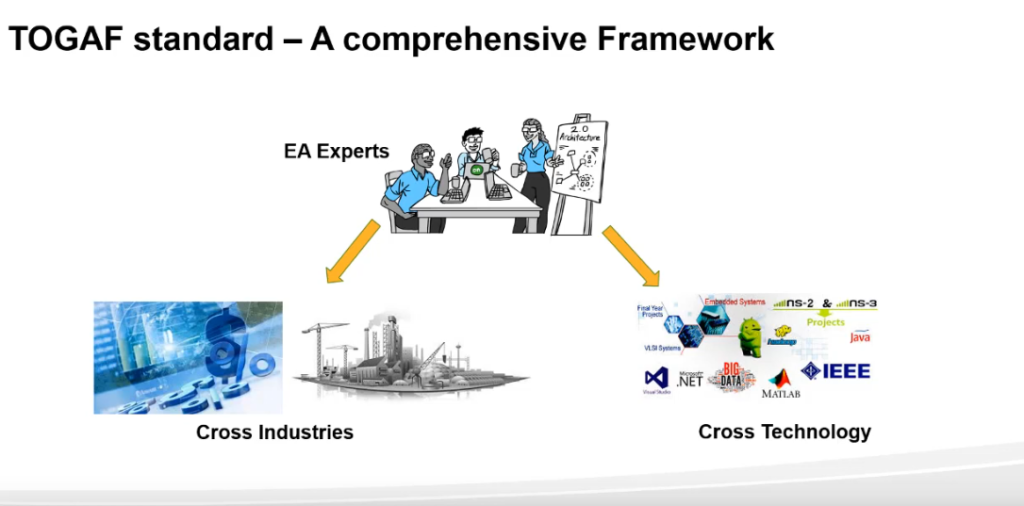
verschillende terreinen toepasbaar op alle technolgieen
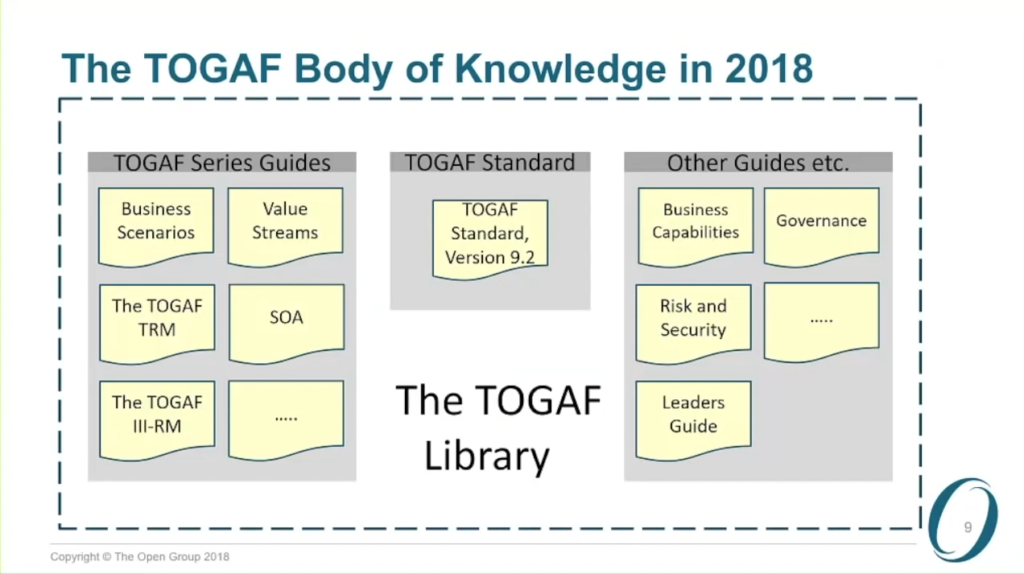
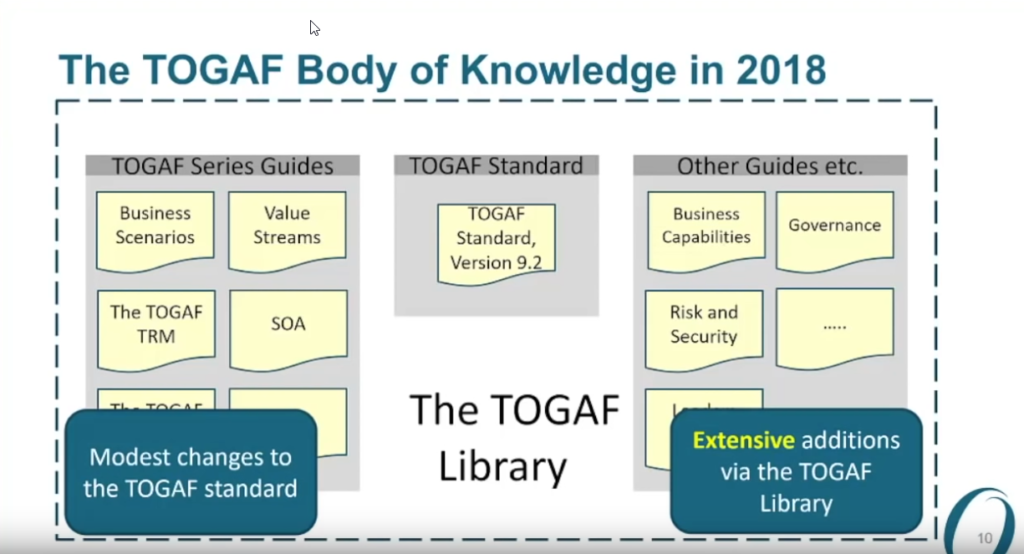
veranderingen vooral in other guides:
Chapter 2 Basis Concepen
2.1 Leer punten
- Wat is de TOGAF standaard?
- Wat is een enterprise?
- Wat is Enterprise Architecture?
- Waarom heb ik een Enterprise Architecture nodig? Wat zijn de voordelen voor het bedrijf?
- Wat is “architecture” in the context van de TOGAF standaard?
- Wat is een architecture raamwerk?
- Waarom heb ik een raamwerk nodig voor Enterprise Architecture?
- Waarom is de TOGAF standaard werkbaar als raamwerk voor Enterprise Architecture?
- Wat behelst de TOGAF standaard?
- Wat zijn de verschillende type architecturen waar de TOGAF standaard mee werkt?
- business, data, application en technology ???
2.2 Introductie van de TOGAF 9 Standaard
2.2.1 Wat is de TOGAF standaard?
De TOGAF standard is een architectuur raamwerk. Het levert de methodes en middelen om te helpen in acceptatie, productie, gebruik en onderhoud van Enterprise Architecturen. Het is gebasseerd op een iteratief process model wat ondersteund wordt door best practices en een herbruikbare set van bestaande architecturele middelen (assets).
De TOGAF standaard is ontworpen en wordt onderhouden door De Open Group Architecture Forum. Eerste versie in 1995 was gabaseerd op the US Department of Defense Technical Architecture Framework for Information Management (TAFIM). De Open Group Architecture Forum heeft meerdere opvolgende versies ontwikkeld van de TOGAF standard op reguliere basis en elke gepubliceerd op de Open Group public website.
“Enterprise willekeurige collectie van een organisatie dat een gemeenschappelijke set van doelen heeft”
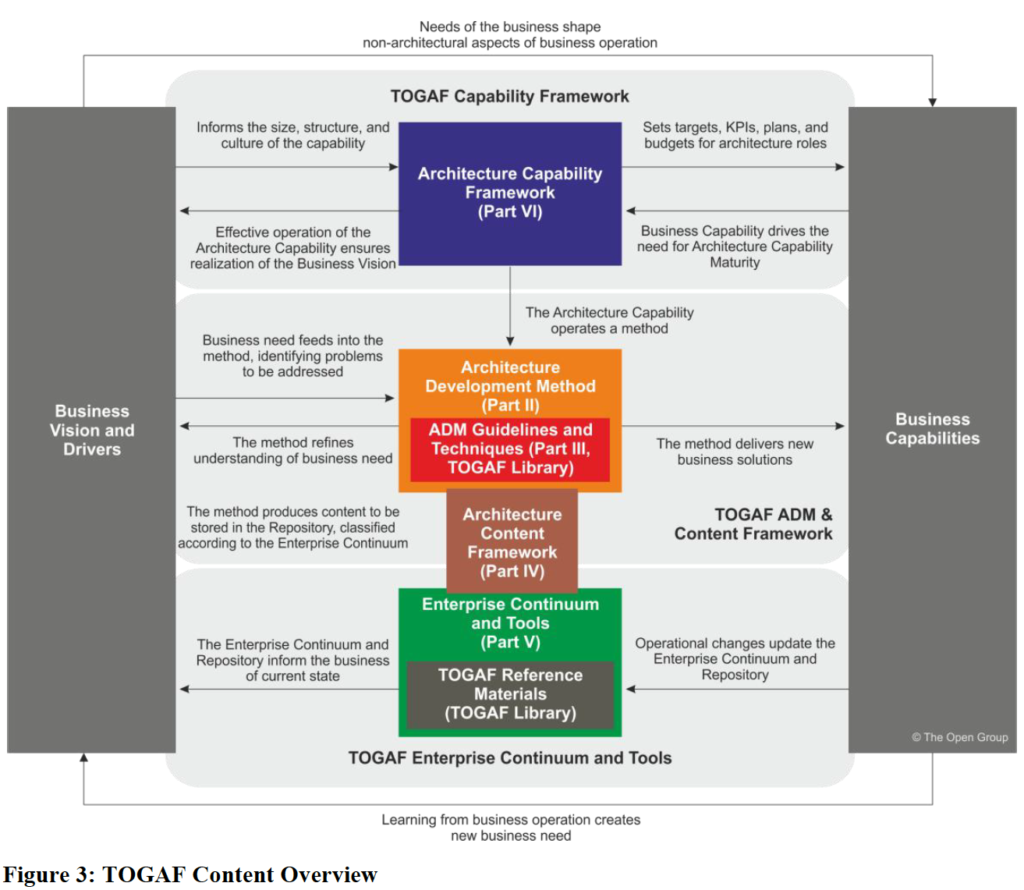
Het kan gebruikt worden voor het ontwikkelen van een uitgebreid aantal verschillende Enterprise Architectures. Het is aanvullend, en kan gebruikt worden samen met, andere raamwerken dat meer de focus hebben op een specifieke oplevering voor bepaalde verticale sectoren, zoals Overheid, Telecommunicatie, Productie, Defensie en bijvoorbeeld Financiën. Een belangrijk onderdeel van de TOGAF standaard is de methode – de TOGAF Architecture Development Method (ADM) – voor het ontwikkelen van een Enterprise Architectuur dat de business benodigdheden adresseert.
2.2.2 Structuur van de TOGAF documentatie
3 Core concepts
Belangrijke elementen:
- Wat zijn de ADM fase namen en het doel van elke fase?
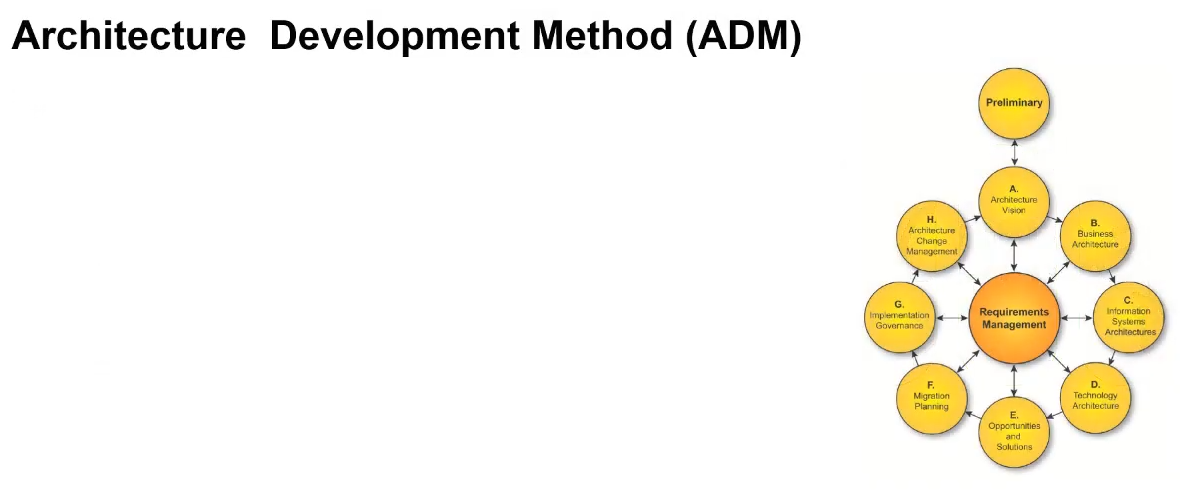
- Fases B/C/D (Business Architecture, Information Systems Architectures, Technology Architecture) zijn onderdeel van Architecture Development Iteration
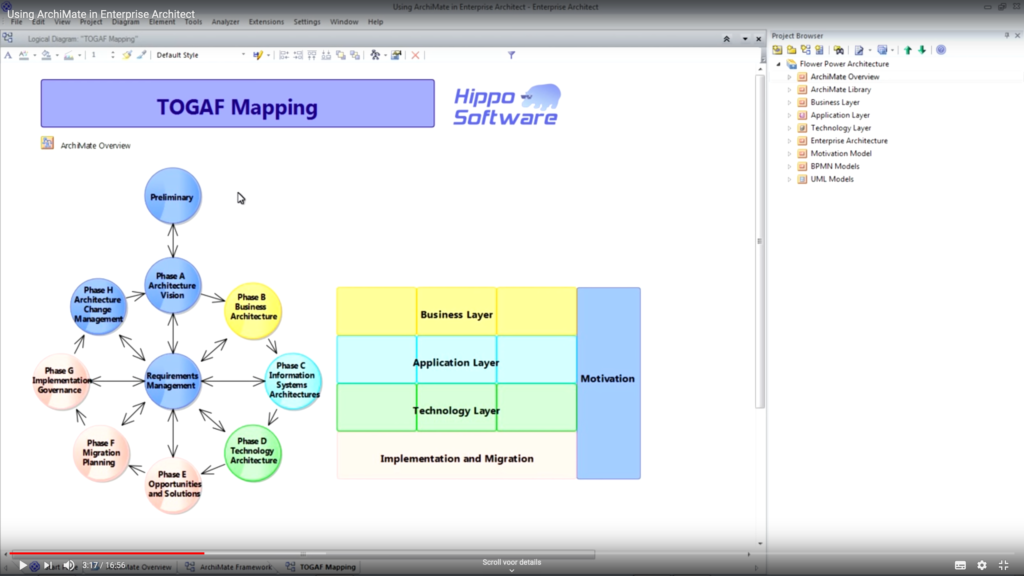
Dit zijn de gekleurde overeenkomsten tussen Archimate en de ADM fases van TOGAF
- Fases B/C/D (Business Architecture, Information Systems Architectures, Technology Architecture) zijn onderdeel van Architecture Development Iteration
- Wat zijn de op te leveren producten,
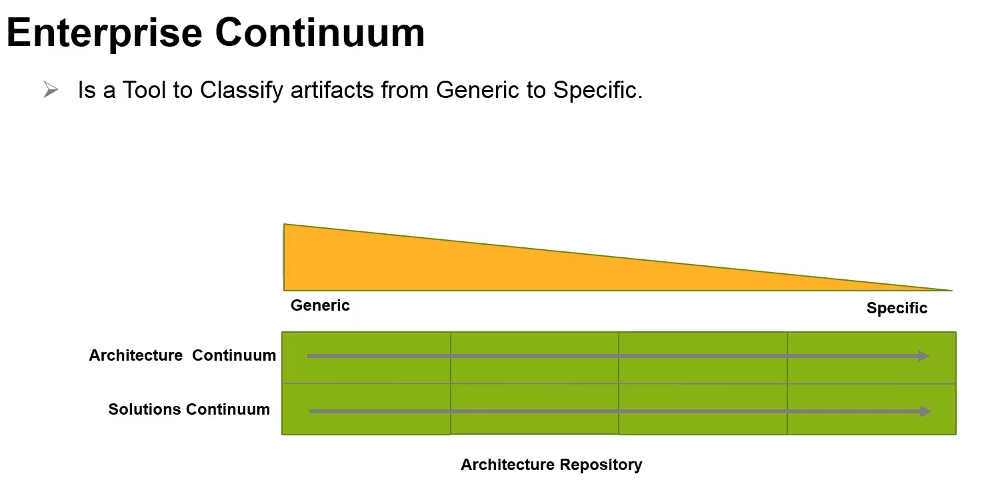
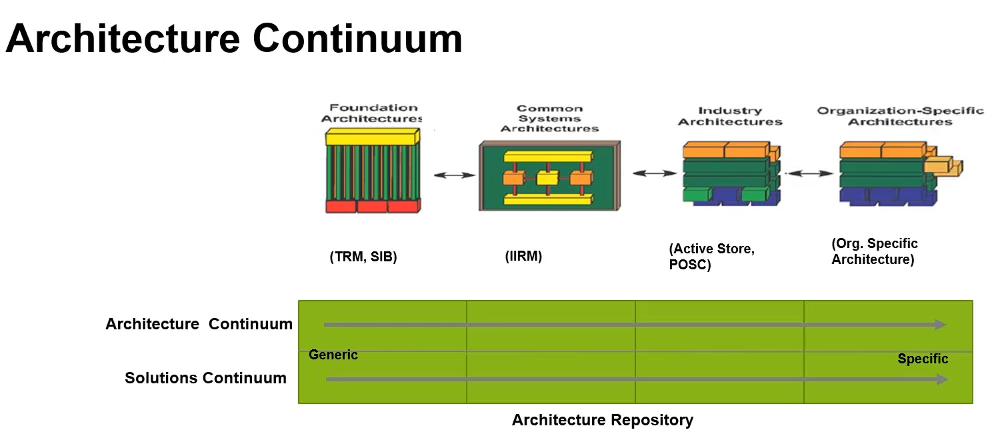
Org Specific zoals bij een Bank kan verschillen tussen banken, maar maken wel gebruik van dezelfde Industry Architecture.
Solution Continuum is de implementatie van een architecture continuum
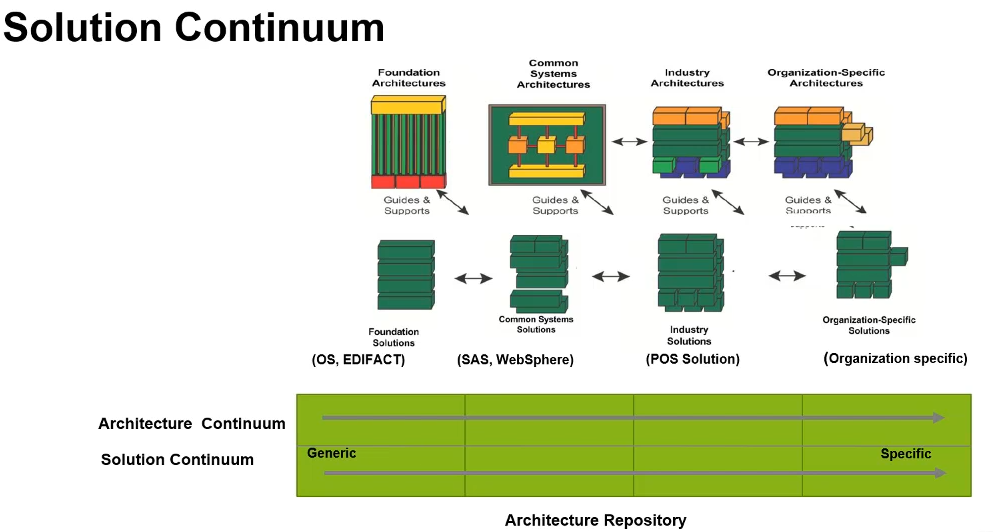
documenten etc die beschrijven van generieke naar heel specifieke oplossing
iMovie from Zero to Hero
It’s a NO DEAL
So there we were waiting for our Graphics and movie dude to create a very important video for a little movement Cindy started in our neighboorhood.
From little steps, we all of a sudden we’re told that our faces would appear on national television, so all of a sudden this idea we had for creating a movie with enough neighbours was a bigger thing. Could we deliver before national television arrived. We were told, that we had to look for someone else, no time at that moment and other stuff that was going on.
It’s on me
Well I suggested that I could give it a try and if that didn’t work out we would look for someone else. Someones daughter also created a professional looking movie with drone footage that was created by one of our neighbours.
Imac lovin’ IT
Never would I have thought that I would be enjoying the part of creating a video. The neighbourhood had sent in videos with a couple of lines of text that was assigned to them. My task was to put it all together, meaning that someone starts a sentence and someone else finishes it. So that looked hard!
I would not have believed that with the Mac OS tools it would be so easy. The tool iMovie is so intuitive that even I could create one video from all the videos like it was done by a pro … and by no means does that say anything about the pro skills that I don’t have! But for basic stuff, this was amazing. Put two videos behind each other, split clips. Delete unwanted parts and zoom in, to find the parts where someone has spoken his last words (oh my) and for the second part, zoom in to the part where someone starts talking the part that was cut away from the first part. Amazing easy. Now some parts were not great in stopping and starting with the audio.
So you right click and detach the audio part. You make in longer to make sure someones audio is allready there and with little dots on the sine wave part of the audio you can easily create fade-ins and fade-outs!
Tricks learned
Some videos length was to short to create longer transitions : you know those fade in screen shots from one part to the other. My wife sent me a whatsapp message with a possible trick: create an empty title screen and put that in between the parts. Now in front and after that empty title screen you can please the desired transitions, as long as you start with a fade to black! I could select those 3 parts and place that in a couple of places, just to make sure we had the same effect in the parts where we wanted it.
After publishing the video, also so easy that I could ask our 9 year old to publish it on Youtube or Vimeo or whatever we wanted, I saw the the picture shown is randomly selected by the iMovie tooling. So all of a sudden one of our neighbours was shown on twitter, facebook, Youtube and Instagram 🙂 … oopsie
Easy fix, but I would never would have figured that out without my girlfriend (Google, this time!) and this was the solution:
- import the created video in Photos
- open it in Photos (do not play!)
- search with the slider the desired picture
- click on the wrench icon and select “set Poster Frame”:
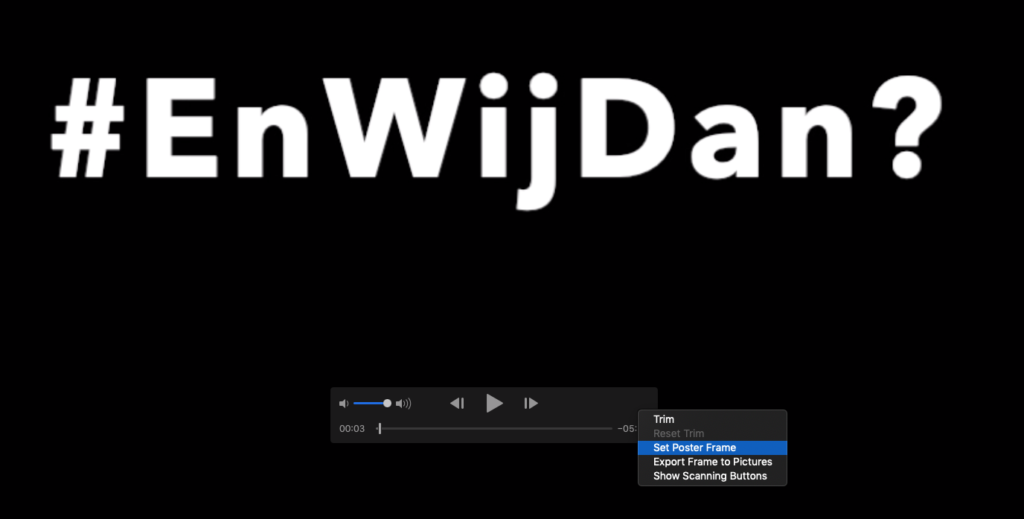
- Save the video and publish your master piece!