
Intro: It’s basic 3.7 version
another blog
Intro: It’s basic 3.7 version
I have always been jealous with the creative kind of people within my business. Doesn’t matter what field they are in, but there are so many talented people doing things they love.
Now don’t get me wrong: I like my job and the field I work in, but if you ask if I love what I am doing … that would be a No. I like my work, because I really know a lot about it and I can relate to the goals our customers like te achieve. I can do a lot of translation in techniques so that we can help them to reach their goals and make the solutions robust enough for the near future.
But I always felt that I didn’t do enough with my skills. Lately I am blogging almost everything I can think about: parenting, self improvement, IT stuff and in between I am also trying to create a website for our “little” Taekwon-Do club.
I never got or took the time to be great in something and it feels like I am missing out on something. Without even having a clue about what it could be.
So that is why I am diving into other things. Not limited to IT related stuff. I can enjoy working in my house, because in my former relationship I was not motivated by my partner to try and learn by doing. In my current relationship we almost always think about it and ask ourselves if we could do it or if it could be to dangerous to try it. That is why we never try to fix toilets … no I am not shitting you 😉
Now I am looking also into other IT related topics:
The last part is getting so big in our company, that it is suffocating the project development and our goals to have quick develivery moments from dev to prod. It is scary that people make decisions, without really diving into the problems. Now we have to protect our internal network connectivity as if we have a hacker inside our organisation. At that point I always wonder if procedures and a good official contract couldn’t be sufficient. Would save so much effort and money.
2 years ago I told my partner that this is something I would love to learn myself and I said that within a year I could do something awesome with Unitiy 3D. As time catches up and I can really come up with a dozen excuses: I didn’t make it. So this is take 2 or 5 more or less.
Most of what I do is learning by example, so this title explains what I did and encountered while I was going along with the book flow.
The first thing I learned was that while traveling a little table and a physical mouse was really a handy thing, because the pad doesn’t really work well.
I skipped the first 4 parts of the book because it was really only telling about Unity 3D and default stuff
The first important part to remember is that you can easily switch to different views by the Layout dropdown list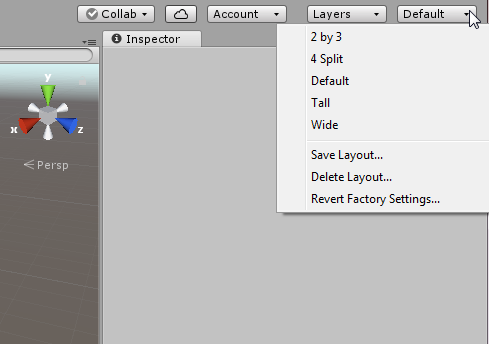
When you are not natively speaking English, than it is not as crystal clear as the ones that have English as their native language.
So assets are the objects we want to use. Like meshes (here we go again. If translated this totally makes no sense) that could be 3D models, houses, trees etc.
That brings us to an important other part of this blog: Unity is a game engine. Not so much an editor. That is why the el cheapoos use Blender 3D, and the more or less pro’s Maya or 3DS Max for the models. GIMP or Photoshop (in the same order for el cheapo and pro 😉 ) for textures (used on created objects) and Audacity to add sound to the world.
After importing the assets through the project menu, you will not see it in your game. They are simply added to be used by you.
A scene in Unity 3D is a level in our game. So remember if your going for mutiple levels in your game!
CTRL-N or File –> New Scene, will give you an almost empty level. Almost because of the default Camera en Lightning that is added to every scene.
In the Hierarchy all the GameObjects are listed. GameObject is every object that you place in the level/scene.
You can select an object by clicking on it in the Scene View, or on the name in the Hierarchy tree.
I wanted to try out some things with the populair online website and blog creation tools. In my search I ended up trying these two tools:
If you visit their websites it all looks so incredible well: you want both…
Well that is not going to happen, so I start my incredible learning learning curve with this one: wordpress.
It all started with adding network capabilities to a fresh install. I used and sub-domain website and for some reason I didn’t get it working with a 4th sub-domain like:
http://<extra_sub>.sub-domain.domain.com
I was starting to dislike the Network function within WordPress that makes this “easy” … but after a complete reinstall and trying above with an appropriate website naming I ended up again with a website link to the admin pages that didn’t work.
In that stage I was considering to deinstall the WordPress software and move on to Drupal … but, than I read a blog that came up with DNS troubles … DNS is off course important if a new sub-domain is added. So I did a refresh on the hosting platform and it still didn’t work. Then I did this magic in my command prompt:

after that command I could reach my newly added website and the wp-admin : I was happy. I could create multiple websites!!
So I created a couple off dummy websites (including this my-tidbits part) to get familiar with the WP parts. Themes and plugins can only be installed through the main WP website. After that you “enable network” on the installed theme/plugin if you like to use it in the other (network) websites.
But be careful, it will not be easy every time … I tried to use an incredible plugin: Participants Database, but trying to use it in the network website I could not get it working. That is because the Network plugin does a copy of all the WP tables with a prefix:
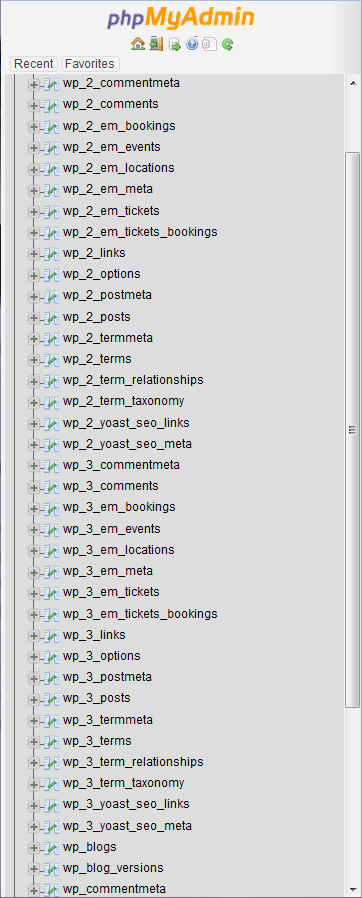
wp_ is the default and the wp_2 and wp_3 are my network websites that I created. So the pluing uses alle the wp_ stuff and there is one wp_participants_database table added.
I copied that table with phpMyAdmin:
I tried to do insert into the groups table, that was not available. So these are the 3 tables that should be copied:

After these copy actions I could use the Participants Database in the network WP site.
I think I should give this as feedback to the creators of this plugin. That is the way we can help each other. So I left a message on the xnau website.
On my search to gain knowledge over tools that are used to make Continuous Integration and Continuous Deployment (CI/CD) easier, I surfed to a website of CoverOS through a link from an other website.
That´s how it goes many times, off course : They offered a solution for a complete open source stack for CI/CD.
 There are plenty off tools that I want to be familiar with:
There are a couple of other tools that I heard off but never used, but want to know about because the endless posibilities that I might not even know off.
Covering the easy part: downloading was easy. After filling out the form on their website, you get an email with a link on it, just in cases that the redirect to the download page doesn’t work. Saving it, will give you an OVA file that you can import with Oracle Virtualbox.